|


 Send Inquiry
 Send SMS



 English
 Spanish
 French
 German
 Italian
 Chinese (Simplified)
 Japanese
 Korean
 Arabic
 Portuguese
 Send Inquiry
USB To 4-Serial Port RS-232 Converter
Price 9500 INR/ Piece
MOQ : 1 , , Piece
USB To 4-Serial Port RS-232 Converter Specification
- Power Supply
- USB Powered (5V, 500mA max)
- Size
- Standard
- Mounting Type
- Desktop or Wall Mountable
- Battery Backup
- No Battery
- Range
- Up to 1.5 meters (USB cable length)
- Connectivity Type
- Wired
- Application
- Industrial automation, POS systems, networking devices, and data acquisition
- Dimension (L*W*H)
- 150 x 80 x 25 mm
- Material
- ABS Enclosure with Metal Base
- Weight
- 220 grams
- Capacity
- Supports up to 4 Devices
- Baud Rate
- 300 bps to 921.6 Kbps
- Compliance
- EMI/RFI compliance for industrial environments
- Indicators
- LED status indicators for Power and each Serial Port
- RS-232 Signals Supported
- TXD, RXD, RTS, CTS, DTR, DSR, DCD, GND, RI
- Supported OS
- Windows 11/10/8.1/8/7/Vista/XP, Linux, MacOS
- Cable Included
- 1.5m USB Cable Included
USB To 4-Serial Port RS-232 Converter Trade Information
- Minimum Order Quantity
- 1 , , Piece
- Supply Ability
- 100 Pieces Per Month
- Delivery Time
- 7 Days
- Main Domestic Market
- All India
About USB To 4-Serial Port RS-232 Converter
USB TO SERIAL CONVERTER ATC-804
- Operational system virtual serial port driver.
- Supports Windows 95/98/Me, 2000, 2003, XP, Vista,Win7, CE, Linux ,MAC
- Power: From the USB port or external power connector.
- RS-232 protection: +15KV ESD. 600W surge protection.
- USB connection: USB B Female connector.
- RS-232 connector: DB9 male.
- Aluminum enclosure dimensions 135 x54 x 108 mm
- Weight 0.8Kg with USB cable
| Computer Interface | USB V1.1/2.0 Plug and Play |
| Field Interface | 4 Port RS-232 |
| Support | Windows 98/ME/XP/2000/CE, MAC & Linux |
| Transmission rate | 300BPS to 460.8 KBPS |
| Supply | From the USB port or external power |
| RS-232 protection | 600W Surge Protection |
| Working Environment | 0°-70°C, 10%-95%RH |
| Transmission rate | from 300 bps to 460.8Kbps. |
| Consumption | <300 mA. |
| Operating environment | -40 to 70°C, 10 to 90%relative humidity, non-condensing |
Robust Connectivity for Multiple Serial Devices
This converter streamlines the connection of up to four RS-232 serial devices to a computer via a single USB port. With comprehensive signal support and LED indicators, users can easily monitor device status and ensure reliable communication in industrial settings.
Wide Operating System Compatibility
Compatible with Windows 11/10/8.1/8/7/Vista/XP, Linux, and MacOS, this device simplifies integration with virtually any modern workstation. No external power supply is needed, making installation straightforward and adaptable for various setups.
Industrial Grade Reliability and Safety
EMI/RFI compliance protects operations in environments prone to electrical interference. The rugged ABS enclosure with a metal base provides physical durability, while desktop or wall mounting ensures install flexibility for space-constrained areas.
FAQs of USB To 4-Serial Port RS-232 Converter:
Q: How do I install the USB to 4-Serial Port RS-232 Converter on my computer?
A: To install, simply connect the converter to your computer using the included 1.5m USB cable. Drivers for Windows, Linux, or MacOS may be required; check manufacturer instructions for installation steps and ensure your system meets the supported OS criteria.Q: What is the benefit of using LED status indicators on this converter?
A: The LED indicators allow you to monitor power and activity on each serial port. This provides instant visual feedback, making troubleshooting and device management easier during operation.Q: When is this converter most commonly used in industrial applications?
A: It is widely used in scenarios such as industrial automation, POS systems, networking device interfacing, and data acquisition, especially when multiple serial devices need to be connected reliably to a modern computer.Q: Where can the converter be mounted in my workspace?
A: Designed for flexible installation, the converter can be mounted on a desktop or fixed to a wall, allowing adaptation to different workspace layouts and requirements.Q: What RS-232 signals does this converter support for connected devices?
A: It supports a comprehensive set of RS-232 signals, including TXD, RXD, RTS, CTS, DTR, DSR, DCD, GND, and RIensuring compatibility with various serial device communication protocols.Q: How does the converter process data from multiple serial devices simultaneously?
A: Each serial port operates independently and is managed via your operating systems driver interface, allowing data from all connected devices to be transmitted and received concurrently without interference.Q: What advantages does USB-powered operation provide for this converter?
A: USB-powered functionality means the converter requires no external power adapter, simplifying installation and power management while maintaining reliability with a maximum draw of 5V, 500mA directly from the host computer.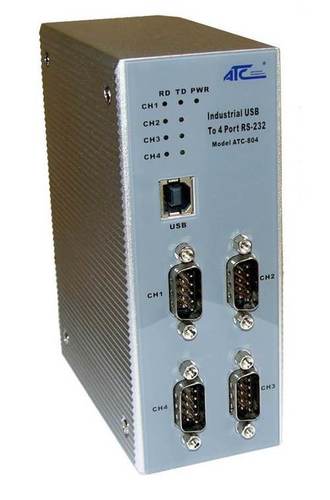
Tell us about your requirement

Price:
Quantity
Select Unit
- 50
- 100
- 200
- 250
- 500
- 1000+
Additional detail
Mobile number
Email

More Products in Communication Product Category
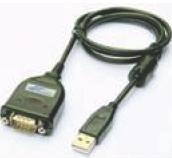
RS485 To USB Converter
Price 1850 INR / Piece
Minimum Order Quantity : 1 Piece
Weight : 0.1 Kilograms (kg)
Dimension (L*W*H) : 67 x 30 x 24 mm Millimeter (mm)
Product Type : USB to serial converter
Application : USB to serial converter
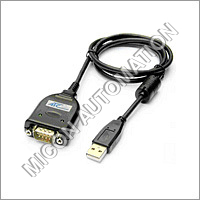
USB To RS232 Converter
Price 1800.0 INR / Box
Minimum Order Quantity : 1 Box
Weight : 0.1 Kilograms (kg)
Product Type : USB to serial converter
Application : USB to serial converter
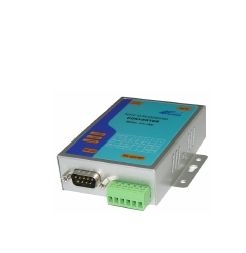
Optically USB Isolated Converter
Price 7100 INR / Piece
Minimum Order Quantity : 1 Piece
Weight : 0.6 Kilograms (kg)
Dimension (L*W*H) : 105 mm X 85 mm X 27 mm Millimeter (mm)
Product Type : RS232 / RS422 / RS485 (3 in 1) to USB Isolated Converter
Application : USB to serial converter
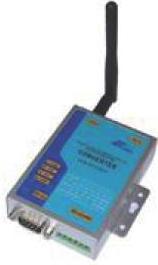
Wireless To Serial Converter
Price 17500 INR
Minimum Order Quantity : 1 , , Piece
Weight : 180g
Dimension (L*W*H) : 110mm x 75mm x 26mm
Product Type : Wireless to Serial Converter
Application : Industrial automation, factory monitoring, data acquisition, remote serial device connectivity

Contact Details
MICON AUTOMATION SYSTEMS PVT. LTD.
GST : 24AAECM7879C1ZB
GST : 24AAECM7879C1ZB

- B No A-814, OFF S.G. HIGHWAY, B/H DCP OFFICE, MAKARBA,Ahmedabad - 380051, Gujarat, India
- Phone : 08045479004

- Mr Niket S Gorakhia (Director)
- Mobile : 08045479004
- niket@miconindia.com
 Send Inquiry
 Send Inquiry
 Send SMS
 |
MICON AUTOMATION SYSTEMS PVT. LTD.
All Rights Reserved.(Terms of Use) Developed and Managed by Infocom Network Private Limited. |
